
Aethersx2 Save data file download-import and Export tutorial




What is Aethersx2 save data
AetherSX2 save files are digital backups of your game progress in PlayStation 2 emulation, and understanding how to manage them is critical for any serious player.
Unlike original PS2 hardware where you swapped physical memory cards, AetherSX2 uses virtual memory cards stored on your Android device. These digital cards work exactly the same way—they hold your game saves, progression data, and sometimes even custom saves you download from online communities. The best part? You can move these saves between your phone and PC using PCSX2, giving you complete flexibility in how you play.
How to Save and Transfer Data in Aethersx2 ?
There are 2 different techniques that can be used to save and transfer data in Aethersx2.
Built-in Export / Import
This method is ideal for transferring save data between Android emulators, such as AetherSX2, NetherSX2, or even PCSX2.

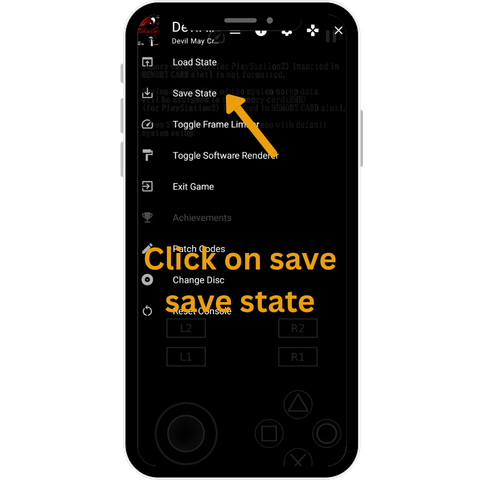
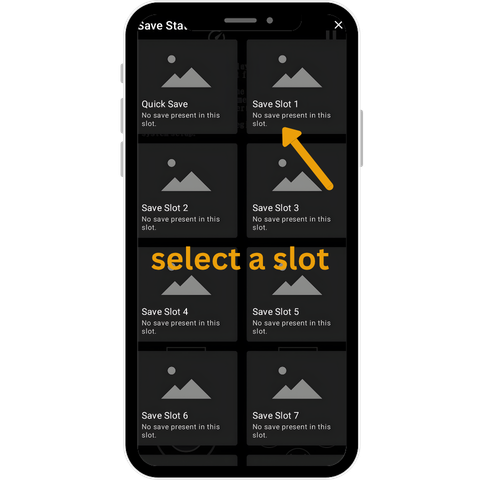
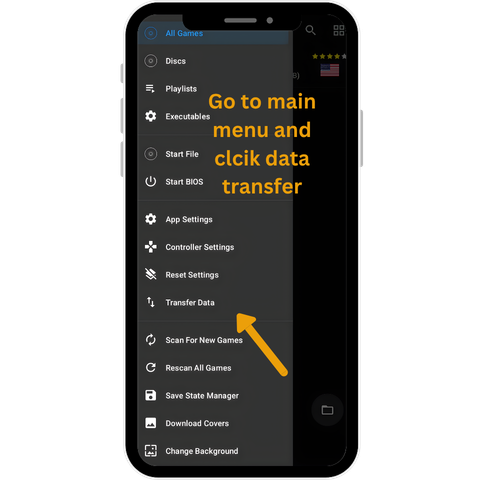
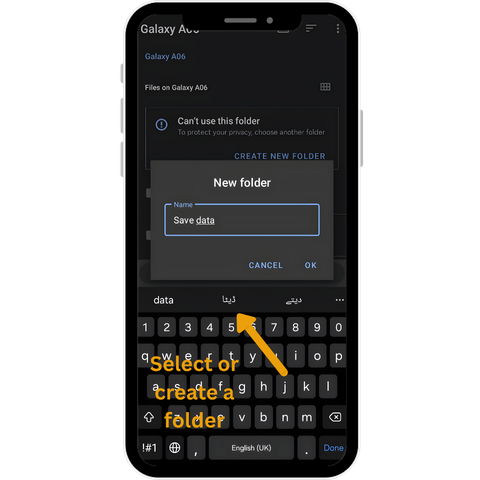
Data transfer From online sources using virtual memory card
This method is useful for the import of data from online sources without using a PC. Before initializing the process make sure your device have 2 additional applications:
Common Troubleshoot
This issue is commonly due to file saving in wrong location. Open your file manager and navigate to /Android/data/com.aethersx2.android/files/memcards/ and check if your file is there.
Also make sure that your file is in right format i.e .ps2, .psu, or .bin.
This usually means the save is corrupted. Check the file size. If it’s much larger than 512KB or seems abnormally small, something went wrong during download.
First, make sure the file format is actually supported. .ps2 and .psu files almost always work. .bin works but is less common. .max and older formats need conversion.
Also check the check how much free storage you have.